
A fit-to-user desk setup and a mini-exercise routine that reduces tendon/nerve load and neck-shoulder strain. Including exact specs and a quick routine worker’s following at their desk (ergonomic assessment and anthropometric fitting, workstation redesign, behavior-change protocol writing, patient education materials development):
A Comprehensive Guide to Ergonomic Workstation Redesign and Neural Load Management.
1. Dr. Turusbekova Akshoola Kozmanbetovna
2. Aakash Dubey
(Teacher, International Medical Faculty, Osh State University, Kyrgyzstan
Student, International Medical Faculty, Osh State University, Kyrgyzstan)
Abstract
The transition to prolonged digital engagement in professional environments has led to a significant increase in work-related musculoskeletal disorders (WMSDs), such as carpal tunnel syndrome and cervical strain. This report provides a multidimensional framework for mitigating these risks by integrating anthropometric fitting standards, biomechanically informed hardware redesign, and clinical exercise protocols. Specifically, it details "nerve flossing" and tendon gliding routines designed to reduce neural and tendinous load. To ensure the sustainability of these interventions, the report outlines behavior-change protocols, including habit stacking and point-of-choice prompts, aimed at transitioning ergonomic awareness into habitual workplace routines.
Keywords: Ergonomics, Carpal Tunnel Syndrome, Nerve Gliding, Workstation Design, Habit Stacking, Occupational Health, Repetitive Strain Injury.
Biomechanical Etiology of Occupational Repetitive Strain Injuries
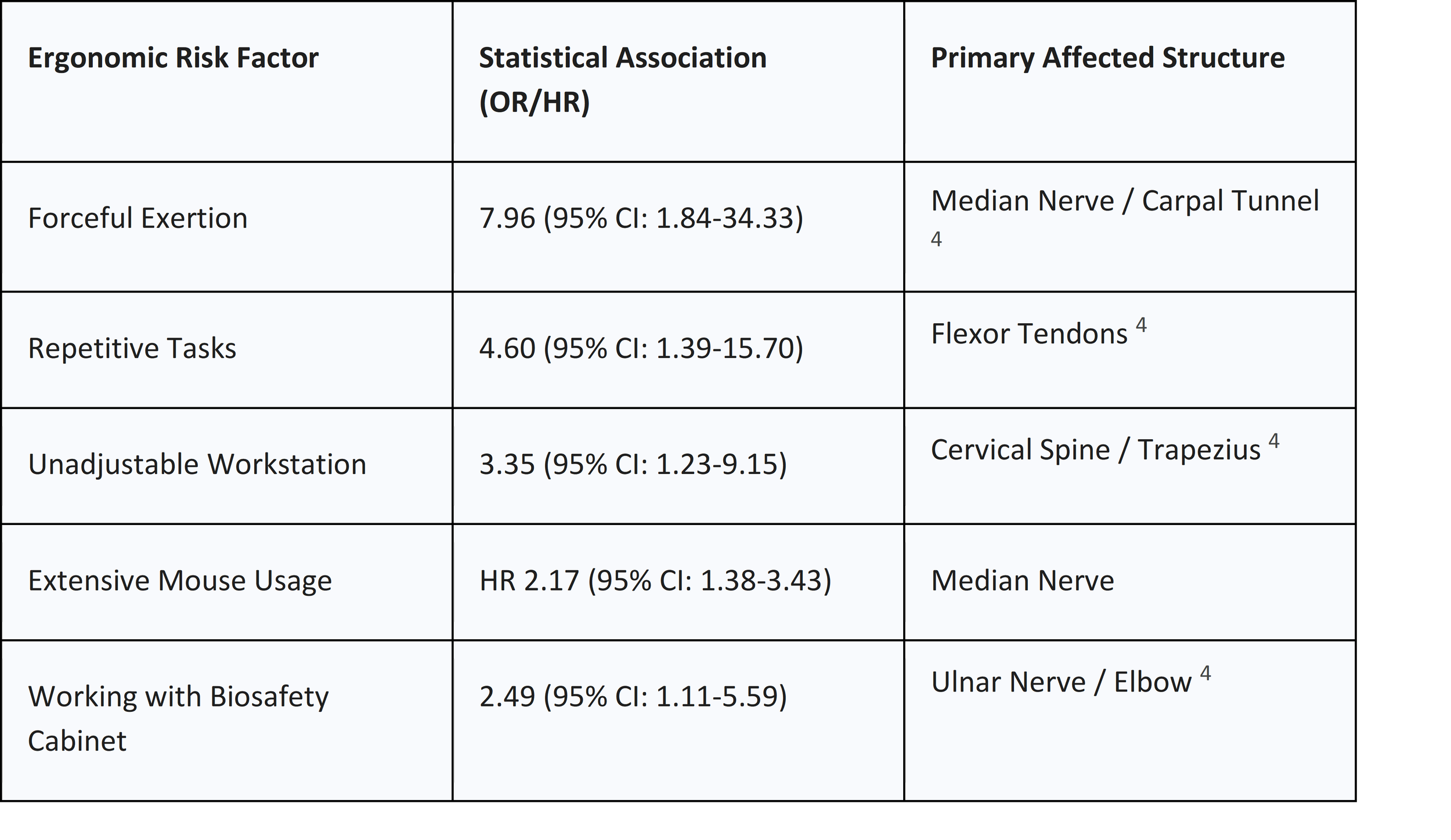
The development of repetitive strain injuries (RSI) is a cumulative process rooted in the physiological response to chronic mechanical stress.1 The most significant risk factors identified in occupational settings include carrying out repetitive tasks for extended durations without adequate rest, maintaining poor posture, and operating within a poorly configured environment.2 These factors converge to produce conditions such as carpal tunnel syndrome (CTS), tendonitis, and ulnar nerve entrapment, which affect the hands, wrists, elbows, and cervical-thoracic regions.2
Neural Entrapment and Hydrostatic Pressure Mechanisms
The primary mechanism underlying carpal tunnel syndrome is the elevation of hydrostatic fluid pressure within the carpal canal.4 Research has demonstrated that non-neutral wrist and forearm postures significantly increase this pressure, which can impair nerve function and lead to long-term axonal damage . For instance, rotating the forearm into a position of full pronation—as required by traditional flat computer mice—can narrow the carpal tunnel space by up to 20%, creating a vise-like compression on the median nerve . This compression is further intensified by active tasks; while merely resting the hand on a device generates low pressure, the muscular tension required for clicking and dragging causes immediate pressure spikes .
The ulnar nerve faces similar risks, primarily at the cubital tunnel in the elbow and Guyon’s canal in the wrist . Prolonged elbow flexion, often seen when workers lean on hard desk surfaces, increases tensile load on the ulnar nerve . This irritation results in "stickiness" or reduced mobility of the nerve within its sheath, manifesting as tingling or numbness in the ring and little fingers .
Tendinous Loading and Adhesion
Tendonitis and tenosynovitis in the upper extremities are driven by the repetitive excursion of tendons through narrow anatomical channels.4 Standard keyboard designs often force users into ulnar deviation—bending the wrists toward the pinky finger—averaging between 10 and 15 degrees.8 This deviation increases the resultant forces exerted by the carpal bones against the flexor tendons, promoting inflammation and potential adhesion.7 In such cases, the tendons no longer slide freely, leading to a reduction in joint range of motion and overall hand function .
Anthropometric Assessment and Workstation Fitting Standards
Achieving a "fit-to-user" workstation requires a systematic assessment of the user's physical dimensions relative to their equipment. The goal is to facilitate a "neutral posture," where joints are positioned such that the least amount of tension is applied to nerves, tendons, and muscles.10
The Sequence of Ergonomic Adjustment
The fitting process must follow a specific hierarchical order, beginning with the chair to establish a stable foundation for the lower kinetic chain .
1. Chair Adjustment: The seat height must allow the feet to rest flat on the floor with the thighs parallel to the ground, maintaining a 90-to-110-degree angle at the knees and hips . If the chair is too high, a footrest is mandatory to prevent pressure on the posterior thighs, which can lead to sciatica .
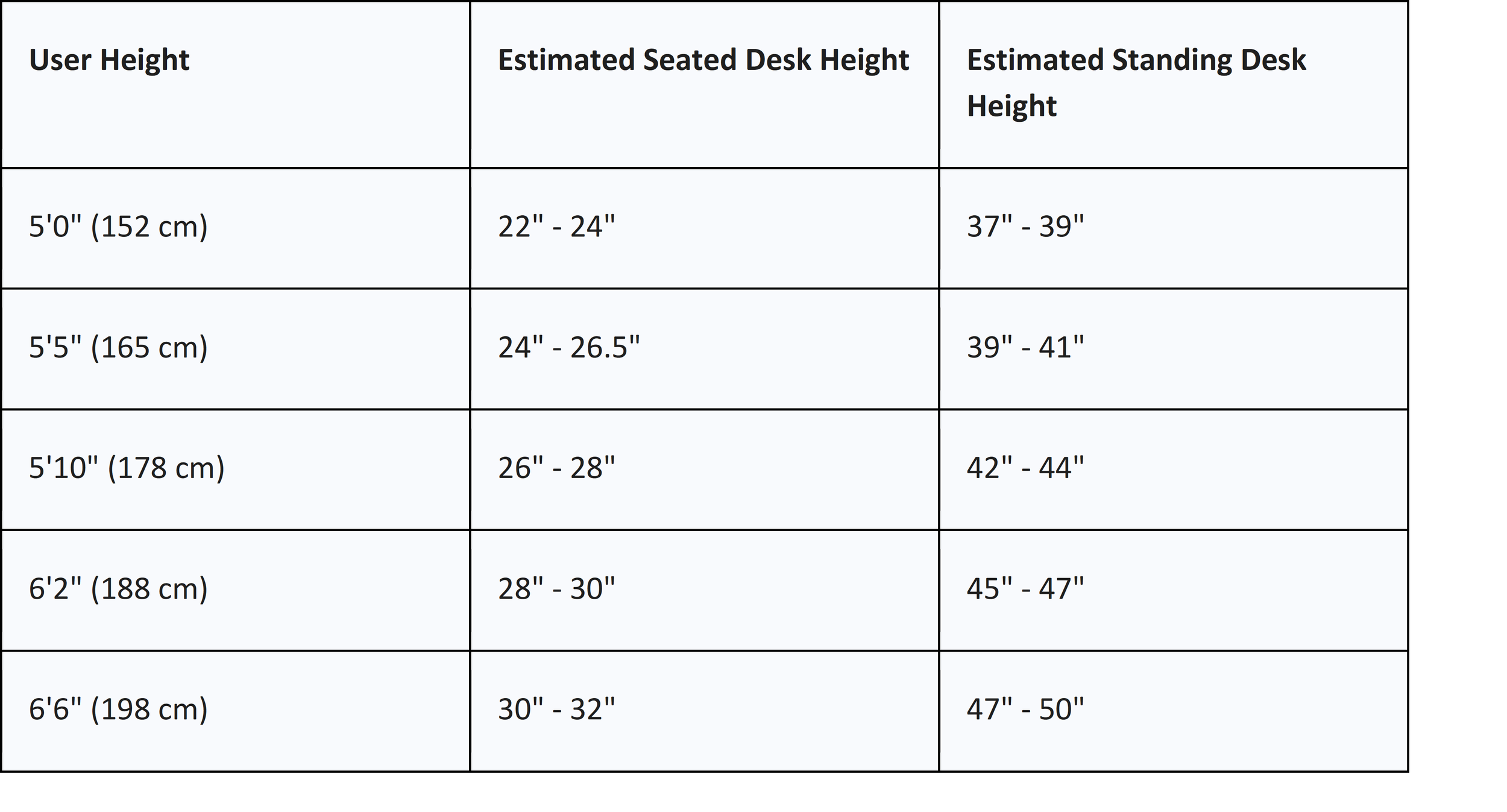
2. Desk Height Alignment: Once the chair is set, the desk surface (or keyboard tray) should be adjusted to align with the user's resting elbow height . Standard 29.5-inch desks are typically appropriate only for individuals approximately 6'4" tall; for most, this height causes shoulder shrugging and compensatory wrist extension .
3. Visual Interface Placement: The monitor should be positioned directly in front of the user at approximately an arm's length (20-30 inches).10 The top of the screen should be at or slightly below eye level to maintain a neutral cervical spine .
Precise Anthropometric Formulas
For organizations seeking to standardize their procurement or fitting protocols, mathematical formulas derived from stature are used to estimate the necessary adjustment ranges .
● Minimum Seated Desk Height (in) = 0.4739 * Height - 6.678
● Maximum Seated Desk Height (in) = 0.5538 * Height - 9.4270
When considering standing workstations, the surface should align with the standing elbow height, which is measured from the floor to the bottom of the elbow while the user stands with relaxed shoulders and arms bent at 90 degrees . For tall users (6'0" to 6'8"), standing desk heights range from 44 to 52 inches, requiring frames with extended travel ranges that exceed standard market offerings
Advanced Workstation Redesign and Hardware Integration
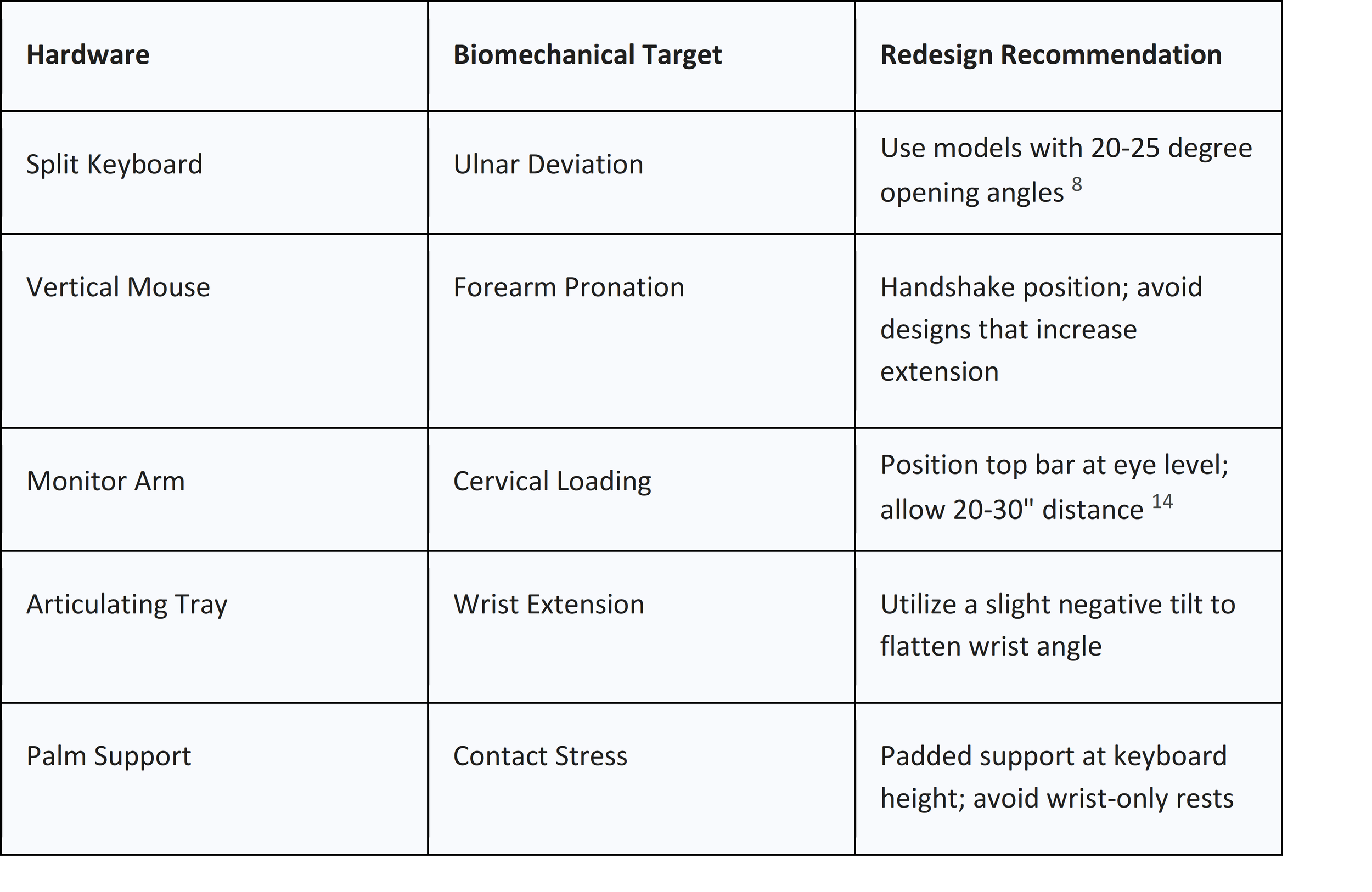
The transition from a standard workstation to an ergonomically optimized environment involves the integration of hardware specifically designed to mitigate known biomechanical stressors.14
Keyboard and Input Device Biomechanics
Traditional keyboards often force users into ulnar deviation because they do not accommodate the natural radial movement patterns of human fingers.9 Split keyboards address this by allowing for separation and splaying of the key modules, bringing the home row closer to shoulder width.15 Research has shown that split configurations can reduce mean ulnar deviation from 12 degrees to less than 5 degrees, promoting a more neutral wrist position.16
The selection of a computer mouse is equally critical. Vertical mice, which rotate the hand into a "handshake" position, are effective for reducing forearm pronation and opening the carpal tunnel space . However, users must be cautioned that some vertical designs may inadvertently increase wrist extension, which can negate the benefits for individuals with existing CTS .
Monitor Arms and Visual Ergonomics
The use of articulating monitor arms allows for precise control over the height, depth, and tilt of the screen, which is essential for preventing cervical strain.14 For users with bifocals, the monitor should be lowered approximately 6 inches and tilted upward 30-40 degrees to accommodate the lower viewing pane of the lenses.17
Clinical Mini-Exercise Routine: Neural and Tendinous Load Management
To counteract the effects of static loading, workers should follow a structured routine designed to mobilize neural tissues and flexor tendons.18 These exercises should be performed gently, as nerves are delicate and highly sensitive to over-stretching .
The "Nerve Flossing" Protocol
Nerve gliding, or flossing, encourages nerves to slide normally through their surrounding soft tissue, preventing entrapment caused by inflammation or scar tissue.18
Ulnar Nerve Glide (Glasses/OK Glide)
Designed to relieve tension at the cubital tunnel .
1. Preparation: Sit upright with the affected arm extended to the side at shoulder height, palm facing upward .
2. Execution: Flex the wrist toward the forearm while simultaneously bending the elbow to bring the hand toward the face. Tilt the head away from the arm to create longitudinal excursion .
3. Dosage: Hold the end position (the "glasses" shape) for 15-30 seconds. Repeat 3 times per side .
Median Nerve Glide
This series helps the median nerve move freely within the carpal tunnel .
1. Step 1: Make a fist with the thumb outside the fingers .
2. Step 2: Extend the fingers while keeping the thumb close to the side of the hand .
3. Step 3: Extend the wrist (bend the hand backward toward the forearm) .
4. Step 4: Extend the thumb away from the fingers .
5. Step 5: Rotate the forearm palm-up (supination) .
6. Step 6: Use the opposite hand to apply a gentle stretch to the thumb .
7. Dosage: Hold each position for 10 seconds. Perform 5 cycles, 3-4 times daily .
The Flexor Tendon Gliding Series
These movements ensure the Flexor Digitorum Profundus and Superficialis tendons glide independently .
1. Straight: Hands in front, fingers fully extended .
2. Hook: Bend the tips of the fingers (DIP/PIP joints) while keeping the large knuckles straight .
3. Tabletop: Bend at the large knuckles (MCP joints), keeping the finger joints straight .
4. Straight Fist: Touch the palm with the fingertips while keeping the end joints straight .
5. Full Fist: A tight fist with the thumb over the fingers .
6. Dosage: Hold each position for 3-7 seconds. Complete 5-10 repetitions per cycle .
Thoracic Spine and Cervical Mobility
Improving upper back mobility is essential for reducing cervical load.20
● Thoracic Extension (Foam Roller): Place the back on a foam roller at the shoulder blades. Lock hands behind the head to support the neck and gently arch backward .
● Cat-Cow Stretch: On all fours, alternate between curving the mid-back upward and arching the back while looking up. Repeat 5-8 times .
● Shoulder Blade Reset: Pull the shoulder blades together, holding for 5 seconds to reset scapular position .
Behavior-Change Protocols for Sustained Adherence
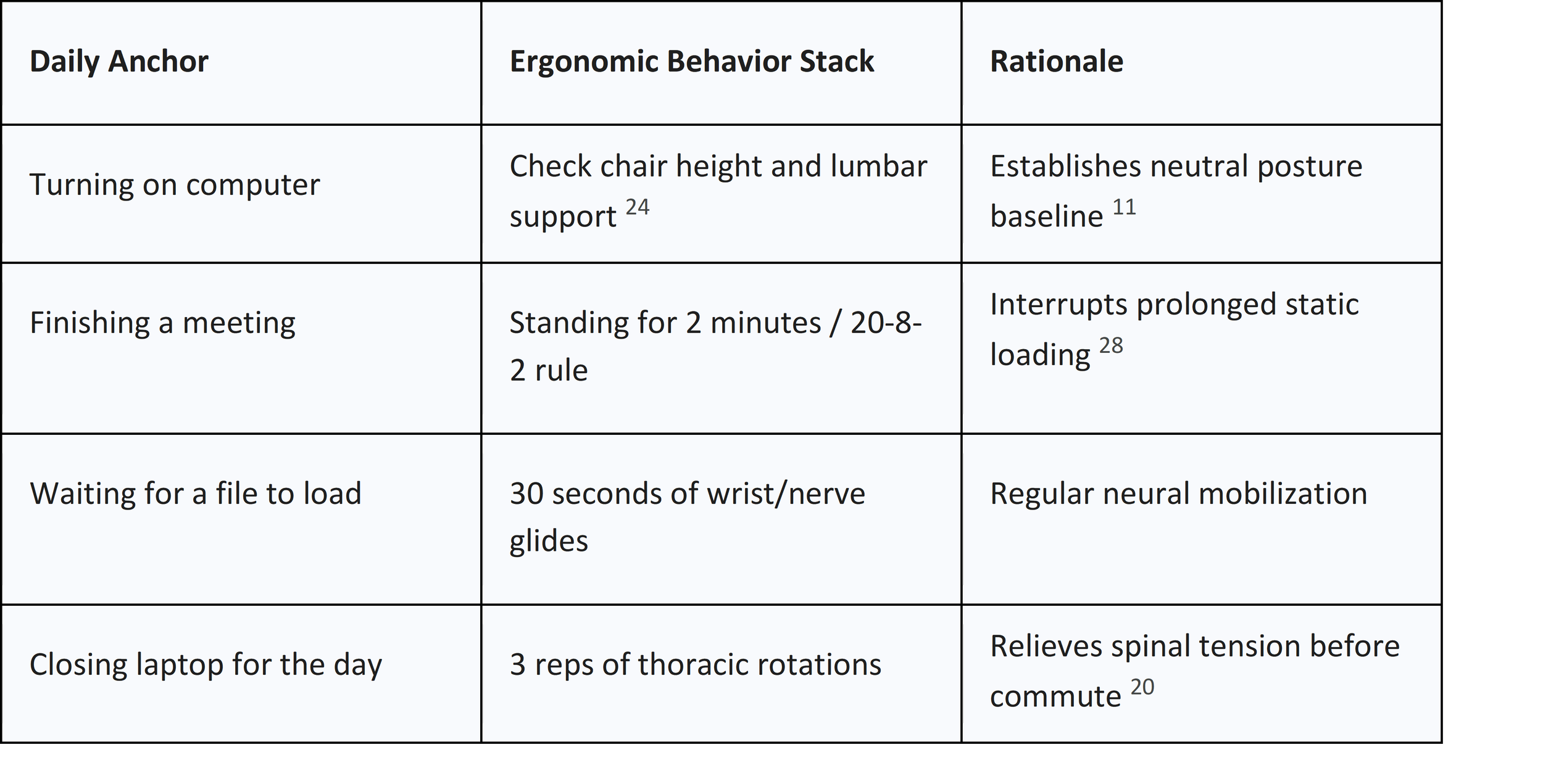
Sustainability hinges on transitioning from effortful awareness to habitual automatism.22
Habit Stacking and Neural Anchoring
Habit stacking involves linking a new desired behavior to an existing routine.22
Formula: "After [Current Habit], I will [New Habit]".25
Point-of-Choice (PoC) Prompts and Visual Feedback
PoC prompts act as cues that encourage active decisions.29 Research indicates that theory-driven prompts (TD-PoC) focusing on self-efficacy have higher long-term acceptability than basic reminders.28 Additionally, visual timers like the "Time Timer" make the passage of time tangible, reducing "anticipatory anxiety" and helping users maintain postural rotation cycles without constant internal time-tracking.30
The 3-3-3 Rule for Micro-Habit Success
To ensure sustainability, interventions should follow the micro-habit principle.27
● 3 Minutes or Less: Keep new habits brief to reduce friction.27
● 3 Small Wins: Aim for one completion in the morning, afternoon, and evening.27
● 3-Week Minimum: Practice a habit for three weeks before adding another behavior to the stack.27
Patient Education and Preventive Strategy Development
Education empowers workers to recognize early signs of tissue distress and understand the "why" behind setup adjustments.2
Warning Signs of Nerve and Tendon Strain
Users should monitor for signs that they are absorbing too much strain .
● Tingling or Numbness: Especially in the first three fingers (median nerve) or the last two (ulnar nerve) .
● Weakened Grip: Difficulty with fine motor tasks like buttoning shirts .
● Throbbing or Swelling: Indicators of localized inflammation .
● Nocturnal Symptoms: Waking up with numb hands, suggesting the need for wrist splinting to maintain neutral posture during sleep .
The "20-8-2" Rule for Postural Rotation
The human body is not designed for static maintenance of any posture . The 20-8-2 rule suggests: sit for 20 minutes in a neutral posture, stand for 8 minutes, and move for 2 minutes every half hour . This rotation ensures blood flow is maintained and disc pressure is periodically reduced .
Conclusion
Biomechanical optimization through precise anthropometric fitting and ergonomic hardware provides the physical foundation for health. However, clinical exercise routines and behavioral science strategies are the mechanisms that translate this foundation into long-term musculoskeletal wellness. By integrating nerve gliding, habit-stacking protocols, and structured postural rotation, individuals can effectively mitigate the risks of the modern digital workspace.
References -
1. Biomechanical risk factors for carpal tunnel syndrome: A pooled study of 2474 workers, accessed January 12, 2026, https://www.researchgate.net/publication/266999475_Biomechanical_risk_factors_for_carpal_tunnel_syndrome_A_pooled_study_of_2474_workers
2. Setting Up Your Ergonomic Office Space, accessed January 12, 2026, https://hsrm.umn.edu/sites/hsrm.umn.edu/files/2022-11/Ergo-FactSheets-v4-(Oct2019)pdf.pdf
3. The Biomechanics of Keyboard Design: Why Traditional Layouts Ignore Human Anatomy, accessed January 12, 2026, https://x-bows.com/blogs/engineering-innovation/keyboard-biomechanics-human-anatomy
4. Wrist and Forearm Posture from Typing on Split and Vertically Inclined Computer Keyboards - CDC Stacks, accessed January 12, 2026, https://stacks.cdc.gov/view/cdc/191592/cdc_191592_DS1.pdf
5. Time on Their Side: How Visual Timers Affect Anticipatory Anxiety, Performance, and On-Task Behavior in Elementary Math Assessments - MDPI, accessed January 12, 2026, https://www.mdpi.com/2254-9625/15/12/243
6. The Role of Visual Timers in Managing Transitions in ABA Therapy, accessed January 12, 2026, https://www.magnetaba.com/blog/the-role-of-visual-timers-in-managing-transitions-in-aba-therapy
7. A Single-Center Study Comparing the Effects of Thoracic Spine ..., accessed January 12, 2026, https://pmc.ncbi.nlm.nih.gov/articles/PMC9275077/
8. Nerve Gliding Exercises | The Arm Doc, accessed January 12, 2026, https://thearmdoc.co.uk/wp-content/uploads/2025/01/Nerve-Gliding-exercises1.pdf
9. Ergonomic Adjustments for Tall Users: A Complete Guide, accessed January 12, 2026, https://eurekaergonomic.com/blogs/eureka-ergonomic-blog/ergonomic-adjustments-tall-users-guide
10. Tendon gliding exercises for hand injuries - Hand Therapy Group, accessed January 12, 2026, https://handtherapy.com.au/tendon-gliding-exercises/
11. Ergonomic Requirements for Work Surfaces | UHS Berkeley, accessed January 12, 2026, https://uhs.berkeley.edu/sites/default/files/uc_ergonomics_checklist_for_work_surfaces_06_2015.pdf
12. Habit Stacking: A Simple Way To Build Consistent Routines | Life Skills Advocate, accessed January 12, 2026, https://lifeskillsadvocate.com/blog/habit-stacking-a-simple-way-to-build-consistent-routines/
13. Prevention and Treatment of Repetitive Strain Injuries - Ozark Orthopaedics, accessed January 12, 2026, https://ozarkorthopaedic.com/prevention-and-treatment-of-repetitive-strain-injuries/
14. 5 Best Ulnar Nerve Entrapment Exercises For Desk Workers ..., accessed January 12, 2026, https://www.contourdesign.eu/resources/health-conditions/ulnar-nerve-entrapment/5-best-ulnar-nerve-entrapment-exercises-for-desk-workers
15. Desk Height for Tall Users | Find Your Perfect Fit - Eureka Ergonomic, accessed January 12, 2026, https://eurekaergonomic.com/blogs/eureka-ergonomic-blog/desk-height-tall-users-guide
16. Do Vertical Mice Actually Help Carpal Tunnel? The Surprising Truth (2026) - X-Bows, accessed January 12, 2026, https://x-bows.com/blogs/engineering-innovation/vertical-mouse-carpal-tunnel-pressure-review
17. Using Point-of-Choice Prompts to Reduce Sedentary ... - Frontiers, accessed January 12, 2026, https://www.frontiersin.org/journals/public-health/articles/10.3389/fpubh.2018.00323/full
18. Carpal tunnel syndrome among laboratory technicians in relation to personal and ergonomic factors at work, accessed January 12, 2026, https://academic.oup.com/joh/article-pdf/59/6/513/58561164/joh2059006005.pdf
19. Habit Stacking for Health: Tiny Rules, Big Results, accessed January 12, 2026, https://mitohealth.com/blog/habit-stacking-health
20. Why use a split keyboard - Kinesis, accessed January 12, 2026, https://kinesis-ergo.com/split-keyboards/
21. Habit Stacking: Building New Behaviors onto Existing Routines, accessed January 12, 2026, https://www.drginacleo.com/post/habit-stacking-building-new-behaviors-onto-existing-routines
22. Ergonomics Awareness Training - Safety - Naval Postgraduate School, accessed January 12, 2026, https://nps.edu/web/safety/ergonomics-training
23. Flexor Tendon Gliding Exercises | St George's Hospital, accessed January 12, 2026, https://www.stgeorges.nhs.uk/wp-content/uploads/2021/09/Flexor-tendon-gliding-exercises.pdf
24. Desk Height Calculator: Plan an Ergonomic Space - Ergotron, accessed January 12, 2026, https://www.ergotron.com/en-us/tools/workspace-planner
25. Wrist and Forearm Posture from Typing on Split and Vertically Inclined Computer Keyboards, accessed January 12, 2026, https://www.researchgate.net/publication/12542829_Wrist_and_Forearm_Posture_from_Typing_on_Split_and_Vertically_Inclined_Computer_Keyboards
26. Therapeutic Exercise Program for Carpal Tunnel Syndrome - OrthoInfo, accessed January 12, 2026, https://orthoinfo.aaos.org/globalassets/pdfs/a00789_therapeutic-exercise-program-for-carpal-tunnel_final.pdf
27. Habit Stacking: How to Build Better Routines that Actually Stick - Dr. Axe, accessed January 12, 2026, https://draxe.com/health/habit-stacking/
28. Effect of Setup Configurations of Split Computer Keyboards on Wrist ..., accessed January 12, 2026, https://academic.oup.com/ptj/article-pdf/81/4/1038/31683805/ptj1038.pdf
29. Desk Height Calculator, accessed January 12, 2026, https://www.omnicalculator.com/everyday-life/desk-height
30. The effect of a vertical mouse on tunnel syndrome - Consensus, accessed January 12, 2026, https://consensus.app/search/the-effect-of-a-vertical-mouse-on-tunnel-syndrome/mkJic3inTWKTbfLR4AN9iA/?utm_source=share&utm_medium=clipboard
31. Tendon Glide Exercises - Minnesota Counties Intergovernmental Trust, accessed January 12, 2026, https://www.mcit.org/blog/resource/tendon-glide-exercises/
32. Assistive Technology - Time Timer, accessed January 12, 2026, https://www.timetimer.com/pages/assistive-technology