
A fit-to-user desk setup and a mini-exercise routine that reduces tendon/nerve load and neck-shoulder strain. Including exact specs and a quick routine worker’s following at their desk (ergonomic assessment and anthropometric fitting, workstation redesign, behavior-change protocol writing, patient education materials development):
A Comprehensive Guide to Ergonomic Workstation Redesign and Neural Load Management.
1. Dr. Turusbekova Akshoola Kozmanbetovna
2. Raghav Sharma
(Teacher, International Medical Faculty, Osh State University, Kyrgyzstan
Student, International Medical Faculty, Osh State University, Kyrgyzstan)
Abstract
Work-related musculoskeletal disorders (WMSDs) represent a global health burden, affecting over 1.71 billion individuals worldwide, with office-based software professionals particularly at risk due to sedentary behavior and suboptimal workstation ergonomics. This report provides an exhaustive, multi-layered framework for occupational health, integrating micro-ergonomic physical adjustments with macro-ergonomic organizational strategies. It details precise anthropometric fitting standards (ANSI/HFES 100-2007 and BIFMA G1-2013), biomechanical engineering of input devices, and environmental factors such as acoustic and lighting lux levels. A clinical "nerve flossing" and tendon gliding protocol is provided to manage neural tension and tendinous adhesions. Furthermore, the report utilizes the COM-B behavior-change model and habit-stacking strategies to ensure long-term adherence. Modern technological adjuncts, including AI-driven posture detection and nutritional strategies for nerve regeneration, are also explored to provide a truly holistic intervention for the modern digital workspace.
Keywords: Ergonomics, WMSDs, Carpal Tunnel Syndrome, Thoracic Outlet Syndrome, COM-B Model, Nerve Gliding, Habit Stacking, Acoustic Ergonomics, AI Posture Correction.
1. Integrated Etiology of Repetitive Strain Injuries (RSI)
Repetitive strain injury (RSI) is an umbrella term for activity-related soft-tissue injuries, including tendonitis, forearm myalgia, and nerve entrapment. These conditions are multifactorial, stemming from an interaction of physical, psychosocial, and environmental stressors.
The Biopsychosocial Pathway
Research indicates that neck and shoulder complaints are predicted by irregular head posture (OR: 1.1), task difficulty/job demands (OR: 1.2), and prolonged daily computer hours (OR: 1.2). Psychosocial stressors like job insecurity, work-family imbalance (OR: 1.6), and hostile work environments (OR: 2.3) produce "mental strain," manifesting as sustained low-level muscle activity that leads to overexertion and injury even without heavy lifting.
Neural and Vascular Entrapment Mechanisms
1. Carpal Tunnel Syndrome (CTS): Caused by elevated hydrostatic pressure in the carpal canal.1 Full forearm pronation narrows this space by 20%, while active clicking causes immediate pressure spikes.2
2. Thoracic Outlet Syndrome (TOS): Compression of the brachial plexus or subclavian vessels in the space between the collarbone and first rib. Neurogenic TOS (95% of cases) causes pain, numbness, and weakening grip, often exacerbated by "tech neck" or drooping shoulders.
3. Cubital Tunnel Syndrome: Irritation of the ulnar nerve at the elbow, often due to prolonged flexion or leaning on hard surfaces.4
2. Anthropometric Fitting and Workstation Technical Specs
Achieving a "fit-to-user" setup requires aligning equipment with the user’s physical dimensions to maintain "neutral posture"—the position where the least tension is applied to nerves and bones.5
The Sequence of Ergonomic Adjustment
The fitting process must follow a specific hierarchical order, starting with the chair.6
Step 1: The Ergonomic Chair
● Seat Height: Feet must be flat on the floor or footrest, with knees at a 90-to-110-degree angle.6
● Seat Depth: Use the "Rule of Three"—leave 2 to 3 inches (three fingers' width) between the seat edge and the back of the knees to prevent sciatica and pressure on the popliteal fossa.7
● Backrest: Adjust to support the lumbar curve, typically across from the navel.6 A recline of 90-105 degrees is recommended to reduce spinal disc pressure.10
Step 2: The Work Surface (ANSI/BIFMA Standards)
Standard 29.5-inch desks are designed for 6'4" individuals; most workers require adjustable surfaces.11
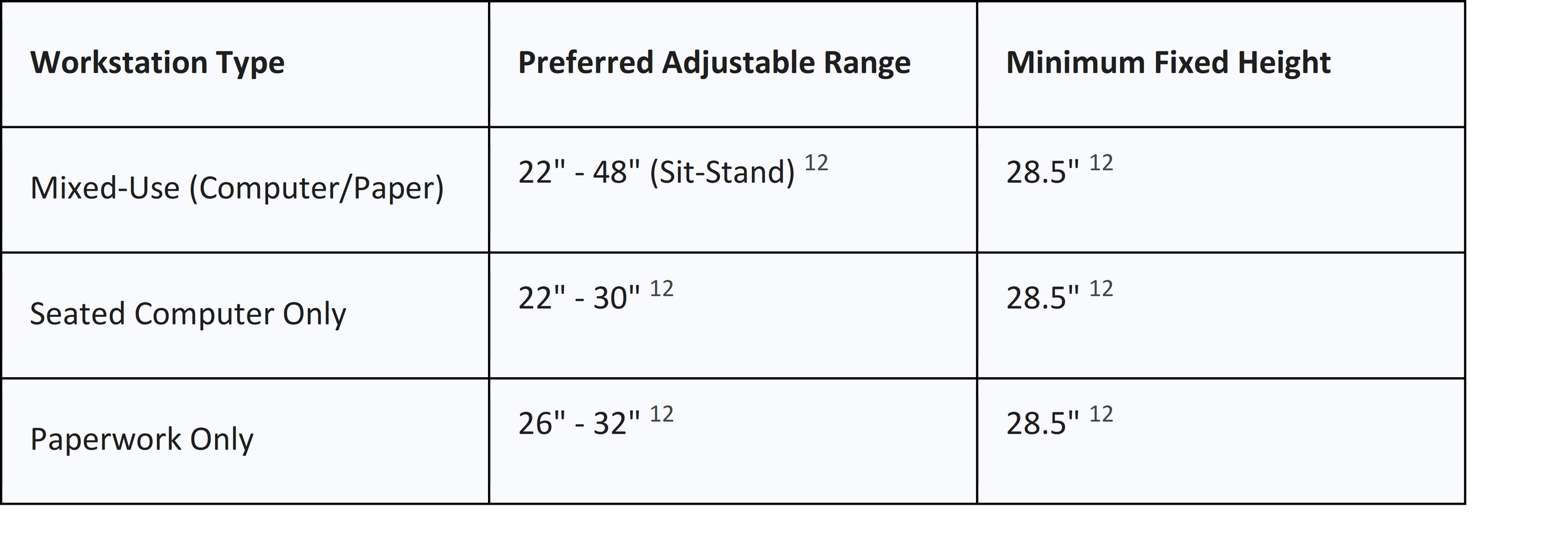
Height Formulas for Custom Fitting 8:
● Minimum Seated Desk Height: 0.4739 * Height - 6.678
● Maximum Seated Desk Height: 0.5538 * Height - 9.4270
● Standing Desk Height: Must align with standing elbow height (elbows at 90 degrees, shoulders relaxed).11 For a 6'6" user, this requires a desk reaching 47-50 inches.11
Step 3: Visual Interface (Monitor)
● Distance: 20 to 30 inches (arm's length) from eyes.7
● Height: Top of the screen at or slightly below eye level. For bifocal users, lower the screen 6 inches and tilt it upward 30-40 degrees.6
● Dual Monitors: Primary monitor directly in front; secondary at an angle to minimize excessive head rotation.7
3. Workstation Redesign and Hardware Integration
Hardware must be selected to negate specific biomechanical stressors identified in the etiology of WMSDs.
Input Device Biomechanics
1. Split Keyboards: Standard keyboards force ulnar deviation of 10-15 degrees.14 Split designs reduce this to within 5 degrees of neutral, significantly lowering carpal tunnel pressure.15 Separating modules to shoulder width is ideal for large-framed users.17
2. Vertical Mice: Rotate the hand into a "handshake" position, reducing forearm pronation and subjective pain.19 However, clinical data shows they may not significantly lower intracarpal pressure if they inadvertently increase wrist extension.20
3. Palm Supports: Use a padded support for palms only when not typing. Avoid wrist rests, as they can double carpal tunnel pressure.7
Desk Engineering and Stability
● Motor Systems: Dual-motor systems are required for heavy "battlestations" to ensure synchronized lifting and dynamic stability.
● The Lateral Push Test: Apply a 10N push to the front corner at standing height; deflection should not exceed 5mm to prevent monitor vibration and eye strain.
● Surface Texture: Matte finishes are mandatory to reduce glare.12
4. Environmental Ergonomics: Invisible Stressors
Acoustics, lighting, and temperature are "invisible" ergonomic factors that directly influence muscle tension and recovery.
Acoustic Health and Well-being
Workplace noise triggers the autonomic nervous system. Physiological well-being is found to be optimal at sound levels around 50 dBA.
● Impact: Loud or constant noise triggers muscle tightness in the neck/shoulders. Exposure to noise increases work stress by 4.88 times and hypertension risk by 2.47 times.
● Intervention: Brief nature-sound interventions (at least 7 minutes) significantly decrease muscle tension (measured by EMG) and pulse rate.
Lighting and Visual Comfort
Computer Vision Syndrome (CVS) affects 58% of office workers.
● Illuminance Standards: 300-500 lux for general work; 750-1000 lux for detailed design.
● Color Temperature: Cool white (4000K-5000K) enhances daytime alertness; warm tones (2700K-3000K) support circadian rhythms during winding down.
● Glare Reduction: Screens must be perpendicular to windows; task lights should be placed to the side of work surfaces, never directly above.
5. AI and Digital Posture Monitoring
Artificial Intelligence (AI) is transforming ergonomic auditing by providing real-time corrective cues without manual intervention.
● Accuracy: Frameworks utilizing TensorFlow MoveNet and Random Forest classifiers achieve up to 100% accuracy in detecting inappropriate sitting and standing postures.
● Efficacy: Implementation of AI posture monitoring has shown a 30% reduction in reported neck and back pain within three months in office settings.
● Early Detection: Deep learning models like ResNet50 can classify cervicogenic headaches (CH) and non-specific neck pain (NSP) from digital images of habitual sitting postures with accuracy rates up to 75%.
6. Clinical Mini-Exercise Routine: Neural and Tendon Gliding
Nerves are delicate and sensitive to stretching; they require "gliding" or "pumping" to release adhesions and restore blood flow.21
The Advanced "Nerve Flossing" Protocol
Perform each sequence slowly. If pain exceeds 3/10, stop immediately.23
Ulnar Nerve (The Waiter/OK Glide)
Relieves cubital tunnel stickiness at the elbow.23
1. Start: Sit tall, extend arm out to the side at shoulder height, palm up.23
2. Move: Bend the elbow and bring the hand toward the face while simultaneously tilting the head away from the arm.
3. Dosage: Hold for 15-30 seconds. Repeat 3 times per side, twice daily.23
Median Nerve (Prayer and Wall Glides)
Helps the nerve move through the carpal tunnel.22
1. Prayer Stretch: Palms together in front of the face; slowly pull hands downward while maintaining full palm contact until a light stretch is felt. Hold 10-30 seconds.22
2. Wall Progression: Place palm on a wall above shoulder height; slowly slide the hand down the wall while keeping the elbow straight.22
Radial Nerve Glide
1. Start: Arm at side, elbow straight, palm facing back.21
2. Move: Bend wrist forward and back; for advanced version, side bend head away from the target arm.21
Flexor Tendon Gliding Series
Complete 5-10 repetitions of each position per cycle, 3-4 times daily.17
Series A (Basic) 24:
1. Straight: Fingers fully extended.
2. Hook: Bend fingertips, keep large knuckles straight.
3. Full Fist: Tight fist with thumb over fingers.
Series B (Functional) 26:
1. Tabletop: Bend at large knuckles, fingers straight (like an "L").
2. Straight Fist: Touch fingertips to the base of the palm.
7. Nutritional Adjuncts and Systemic Hydration
Biological resiliency is a prerequisite for musculoskeletal health.
Spinal Hydration and Height Loss
The intervertebral disc is an osmotic system. Just 30 minutes of steady sitting can cause 1mm to 4mm of height loss in lumbar discs as fluid is discharged.
● The Pumping Mechanism: Movement and systemic hydration allow the discs to reabsorb water and electrolytes, maintaining spinal nutrition and biomechanical function.
Nutritional Strategies for RSI Recovery
1. Vitamin B6 (Pyridoxine): 100-150 mg daily for 10-12 weeks has shown 40% reduction in pain intensity and improved grip strength. Warning: Avoid doses >200 mg/day to prevent sensory neuropathy.
2. Vitamin B12 (Methylcobalamin): 1500 mcg daily improves nerve conduction velocity and action potentials.
3. Anti-Inflammatory Diet: Adherence to a Mediterranean-style diet (high in omega-3s, low in red meat/processed foods) is correlated with lower pain perception and better sleep satisfaction in chronic pain patients.
8. Behavior-Change Intervention: The COM-B Model
Sustainable ergonomics requires addressing Capability (physical/mental), Opportunity (environmental), and Motivation (reflective/automatic).
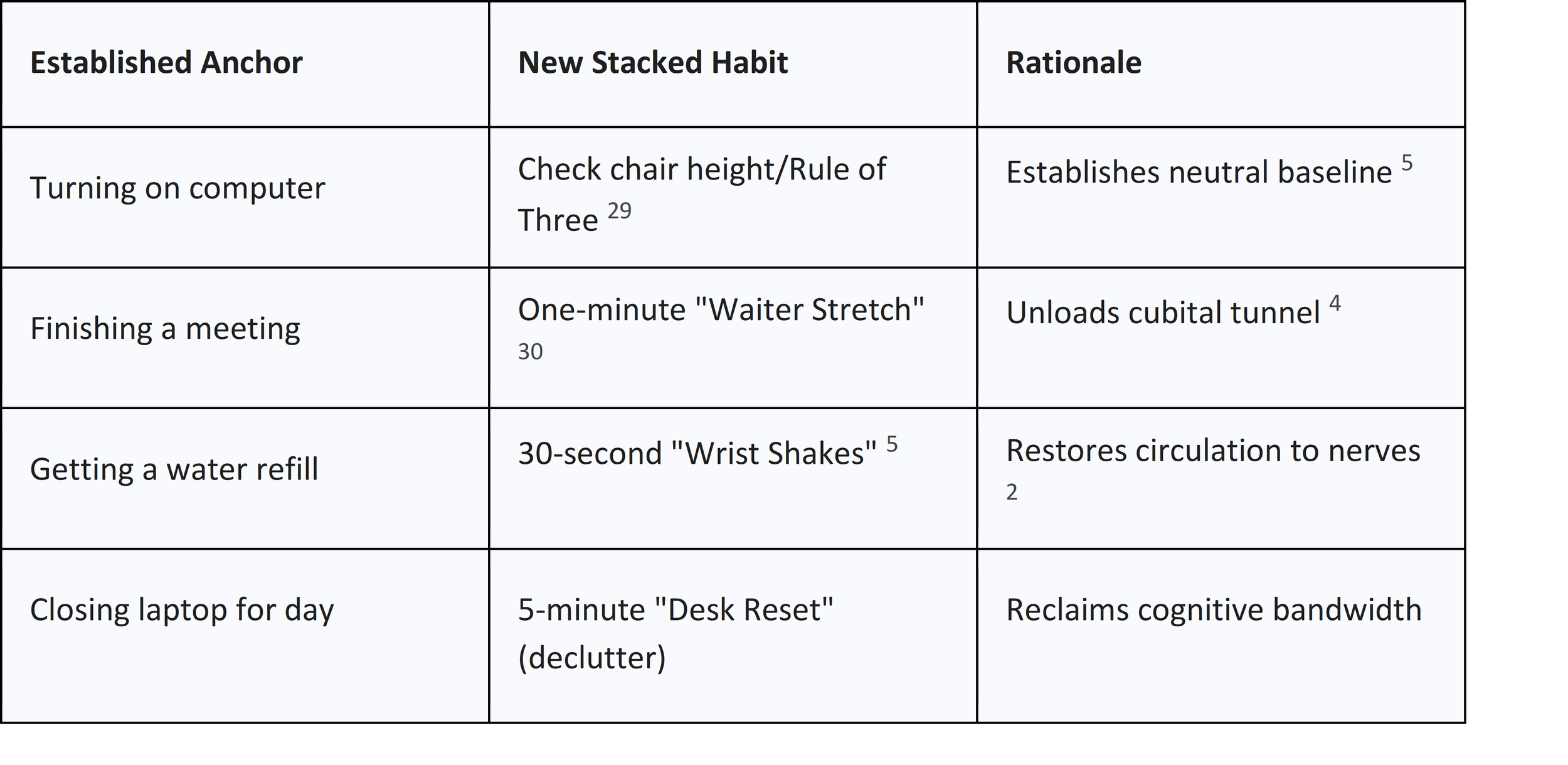
Habit Stacking for the Workday
Link new ergonomic behaviors to existing "anchors" to reduce mental effort.27
Formula: "After [Established Habit], I will [New Ergonomic Habit]."
The 20-8-2 Postural Rotation Rule
To prevent static loading, follow this cycle every 30 minutes 11:
● 20 Minutes Sitting: In neutral posture.
● 8 Minutes Standing: At standing elbow height.
● 2 Minutes Moving: Walk, march in place, or stretch.
Visual Timers and "Time Whisperers"
Visual timers (e.g., Time Timer) provide a tangible countdown that reduces "anticipatory anxiety" and prevents "cognitive flickering" where attention is diverted from timekeeping.31 They improve on-task behavior and support transitions between sitting and standing cycles.33
9. Cognitive Ergonomics: Desk Minimalism
A cluttered desk isn't just an aesthetic issue; it has measurable cognitive costs.
● Cognitive Load: Visual clutter (papers, wires) competes for attention, raising cortisol levels and depleting cognitive capacity.
● Productivity: Workspace clutter can reduce overall productivity by up to 40%, as the average person spends 55 minutes daily searching for items.
● The One-Touch Rule: Items should be filed, binned, or used immediately upon interaction to prevent accumulation.
10. Patient Education and Mental Models
Clinicians should use analogies to help workers reconceptualize their pain experience.
● The Sensitive Alarm System: Explain that pain is an alarm that can become over-sensitized (peripheral sensitization) even when tissues are healing.
● The CEO Brain: Analogize the brain as a CEO that processes pain based on perceived threat levels rather than just physical input.
● Nerve Flossing: Explain neural mobilization as "flossing" a nerve through its sheath rather than aggressively stretching it like a rubber band.23
11. Conclusion
The mitigation of occupational RSI requires a systemic synthesis of biomechanical engineering, environmental optimization, and behavioral science. By implementing BIFMA-compliant workstation dimensions, managing acoustic and lighting lux levels, and supporting tissues with systemic hydration and B-vitamin protocols, workers can significantly reduce their mechanical load. When these physical changes are integrated into the workday through habit stacking and the 20-8-2 rotation rule, they transition from effortful tasks into sustainable, health-preserving routines.
References -
1. Association between work-related biomechanical risk factors and the occurrence of carpal tunnel syndrome: an overview of systematic reviews and a meta-analysis of current research - PubMed Central, accessed January 12, 2026, https://pmc.ncbi.nlm.nih.gov/articles/PMC4553935/
2. Carpal Tunnel Syndrome vs. Tendonitis: Knowing the Difference for Computer Users, accessed January 12, 2026, https://www.protoarc.com/blogs/news/ergonomic-mouse-carpal-tunnel-vs-tendonitis
3. Do Vertical Mice Actually Help Carpal Tunnel? The Surprising Truth (2026) - X-Bows, accessed January 12, 2026, https://x-bows.com/blogs/engineering-innovation/vertical-mouse-carpal-tunnel-pressure-review
4. 3 Simple Ulnar Nerve Exercises for Your Desk - Triangle Physiotherapy, accessed January 12, 2026, https://www.trianglephysiotherapy.com/ulnar-nerve-entrapment/3-simple-ulnar-nerve-exercises-for-your-desk
5. Ergonomics Awareness Training - Safety - Naval Postgraduate School, accessed January 12, 2026, https://nps.edu/web/safety/ergonomics-training
6. Setting Up Your Ergonomic Office Space, accessed January 12, 2026, https://hsrm.umn.edu/sites/hsrm.umn.edu/files/2022-11/Ergo-FactSheets-v4-(Oct2019)pdf.pdf
7. How to Set Up an Ergonomic Workstation | Expert Guide - Humanscale, accessed January 12, 2026, https://www.humanscale.com/insights/how-to-set-up-an-ergonomically-designed-workstation-at-home-a-complete-guide
8. Desk Height Calculator, accessed January 12, 2026, https://www.omnicalculator.com/everyday-life/desk-height
9. Ergonomic Adjustments for Tall Users: A Complete Guide, accessed January 12, 2026, https://eurekaergonomic.com/blogs/eureka-ergonomic-blog/ergonomic-adjustments-tall-users-guide
10. Standards for Computer Workstations at Duke, accessed January 12, 2026, https://www.safety.duke.edu/sites/default/files/StandardsandGuidelinesforComputerWorkstations.pdf
11. Desk Height for Tall Users | Find Your Perfect Fit - Eureka Ergonomic, accessed January 12, 2026, https://eurekaergonomic.com/blogs/eureka-ergonomic-blog/desk-height-tall-users-guide
12. Ergonomic Requirements for Work Surfaces | UHS Berkeley, accessed January 12, 2026, https://uhs.berkeley.edu/sites/default/files/uc_ergonomics_checklist_for_work_surfaces_06_2015.pdf
13. Desk Height Calculator: Plan an Ergonomic Space - Ergotron, accessed January 12, 2026, https://www.ergotron.com/en-us/tools/workspace-planner
14. The Biomechanics of Keyboard Design: Why Traditional Layouts Ignore Human Anatomy, accessed January 12, 2026, https://x-bows.com/blogs/engineering-innovation/keyboard-biomechanics-human-anatomy
15. Wrist and Forearm Posture from Typing on Split and Vertically Inclined Computer Keyboards - CDC Stacks, accessed January 12, 2026, https://stacks.cdc.gov/view/cdc/191592/cdc_191592_DS1.pdf
16. Wrist and Forearm Posture from Typing on Split and Vertically Inclined Computer Keyboards, accessed January 12, 2026, https://www.researchgate.net/publication/12542829_Wrist_and_Forearm_Posture_from_Typing_on_Split_and_Vertically_Inclined_Computer_Keyboards
17. Effect of Setup Configurations of Split Computer Keyboards on Wrist ..., accessed January 12, 2026, https://academic.oup.com/ptj/article-pdf/81/4/1038/31683805/ptj1038.pdf
18. Why use a split keyboard - Kinesis, accessed January 12, 2026, https://kinesis-ergo.com/split-keyboards/
19. Evaluation of flat, angled, and vertical computer mice and their effects on wrist posture, pointing performance, and preference - CDC Stacks, accessed January 12, 2026, https://stacks.cdc.gov/view/cdc/222235/cdc_222235_DS1.pdf
20. The effect of a vertical mouse on tunnel syndrome - Consensus, accessed January 12, 2026, https://consensus.app/search/the-effect-of-a-vertical-mouse-on-tunnel-syndrome/mkJic3inTWKTbfLR4AN9iA/?utm_source=share&utm_medium=clipboard
21. Nerve Gliding Exercises | The Arm Doc, accessed January 12, 2026, https://thearmdoc.co.uk/wp-content/uploads/2025/01/Nerve-Gliding-exercises1.pdf
22. Upper Extremity Nerve Glide - OrthoVirginia, accessed January 12, 2026, https://www.orthovirginia.com/wp-content/uploads/2023/07/Ho-Upper-Extremity.pdf
23. 5 Best Ulnar Nerve Entrapment Exercises For Desk Workers ..., accessed January 12, 2026, https://www.contourdesign.eu/resources/health-conditions/ulnar-nerve-entrapment/5-best-ulnar-nerve-entrapment-exercises-for-desk-workers
24. Therapeutic Exercise Program for Carpal Tunnel Syndrome - OrthoInfo, accessed January 12, 2026, https://orthoinfo.aaos.org/globalassets/pdfs/a00789_therapeutic-exercise-program-for-carpal-tunnel_final.pdf
25. Tendon Glide Exercises - Minnesota Counties Intergovernmental Trust, accessed January 12, 2026, https://www.mcit.org/blog/resource/tendon-glide-exercises/
26. Tendon gliding exercises for hand injuries - Hand Therapy Group, accessed January 12, 2026, https://handtherapy.com.au/tendon-gliding-exercises/
27. Habit Stacking: Building New Behaviors onto Existing Routines, accessed January 12, 2026, https://www.drginacleo.com/post/habit-stacking-building-new-behaviors-onto-existing-routines
28. Habit Stacking: A Simple Powerful Tool for Behavior Change | - Avidon Health, accessed January 12, 2026, https://avidonhealth.com/health-coaches/habit-stacking-a-simple-powerful-tool-for-behavior-change/
29. Stacking Your Way to a Better You - Southwest General Health Center, accessed January 12, 2026, https://www.swgeneral.com/blog/2025/january/stacking-your-way-to-a-better-you/
30. Habit Stacking: Build New Healthy Habits that Stick | AdventHealth Whole Health Institute, accessed January 12, 2026, https://www.adventhealth.com/adventhealth-whole-health-institute/blog/habit-stacking-build-new-healthy-habits-stick
31. Time on Their Side: How Visual Timers Affect Anticipatory Anxiety, Performance, and On-Task Behavior in Elementary Math Assessments - MDPI, accessed January 12, 2026, https://www.mdpi.com/2254-9625/15/12/243
32. Assistive Technology - Time Timer, accessed January 12, 2026, https://www.timetimer.com/pages/assistive-technology
33. The Role of Visual Timers in Managing Transitions in ABA Therapy, accessed January 12, 2026, https://www.magnetaba.com/blog/the-role-of-visual-timers-in-managing-transitions-in-aba-therapy